 56c4c6991f
* ⬆️ Upgrade TS to 4.3.5

* 👕 Add ESLint configs

* 🎨 Add Prettier config

* 📦 Add deps and commands

* ⚡ Adjust global .editorconfig to new ruleset

* 🔥 Remove unneeded local .editorconfig

* 📦 Update deps in editor-ui

* 🔨 Limit Prettier to only TS files

* ⚡ Add recommended VSCode extensions

* 👕 Fix build

* 🔥 Remove Vue setting from global config

* ⚡ Disable prefer-default-export per feedback

* ✏️ Add forgotten divider

* 👕 Disable no-plusplus

* 👕 Disable class-methods-use-this

* ✏️ Alphabetize overrides

* 👕 Add one-var consecutive override

* ⏪ Revert one-var consecutive override

This reverts commit b9252cf935659ba6d76727ad484a1d3c00008fcc.

* 🎨 👕 Lint and format workflow package (#2121)

* 🎨 Format /workflow package

* 👕 Lint /workflow package

* 🎨 Re-format /workflow package

* 👕 Re-lint /workflow package

* ✏️ Fix typo

* ⚡ Consolidate if-checks

* 🔥 Remove prefer-default-export exceptions

* 🔥 Remove no-plusplus exceptions

* 🔥 Remove class-methods-use-this exceptions

* 🎨 👕 Lint and format node-dev package (#2122)

* 🎨 Format /node-dev package

* ⚡ Exclude templates from ESLint config

This keeps the templates consistent with the codebase while preventing lint exceptions from being made part of the templates.

* 👕 Lint /node-dev package

* 🔥 Remove prefer-default-export exceptions

* 🔥 Remove no-plusplus exceptions

* 🎨 👕 Lint and format core package (#2123)

* 🎨 Format /core package

* 👕 Lint /core package

* 🎨 Re-format /core package

* 👕 Re-lint /core package

* 🔥 Remove prefer-default-export exceptions

* 🔥 Remove no-plusplus exceptions

* 🔥 Remove class-methods-use-this exceptions

* 🎨 👕 Lint and format cli package (#2124)

* 🎨 Format /cli package

* 👕 Exclude migrations from linting

* 👕 Lint /cli package

* 🎨 Re-format /cli package

* 👕 Re-lint /cli package

* 👕 Fix build

* 🔥 Remove prefer-default-export exceptions

* ⚡ Update exceptions in ActiveExecutions

* 🔥 Remove no-plusplus exceptions

* 🔥 Remove class-methods-use-this exceptions

* 👕 fix lint issues

* 🔧 use package specific linter, remove tslint command

* 🔨 resolve build issue, sync dependencies

* 🔧 change lint command

Co-authored-by: Ben Hesseldieck <b.hesseldieck@gmail.com>
n8n - Workflow Automation Tool

n8n is a free and open fair-code distributed node-based Workflow Automation Tool. You can self-host n8n, easily extend it, and even use it with internal tools.
Contents
- Demo
- Getting Started
- Available integrations
- Documentation
- Create Custom Nodes
- Contributing
- What does n8n mean and how do you pronounce it
- Support
- Jobs
- Upgrading
- License
Demo
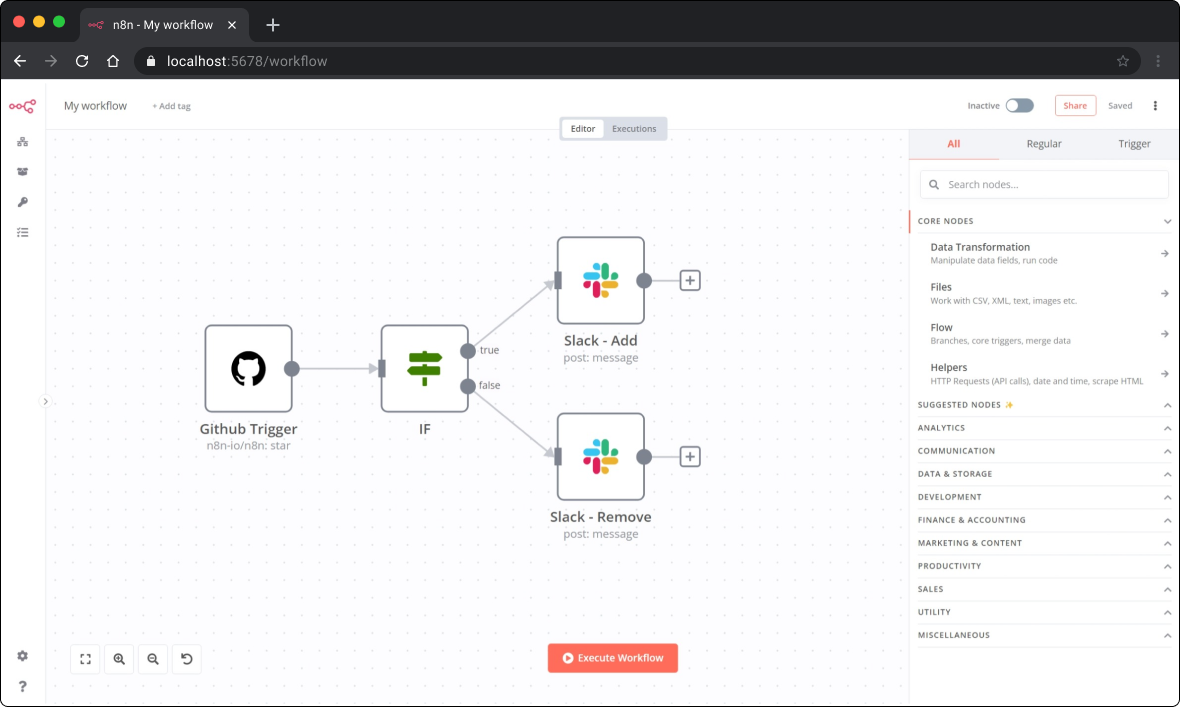
📺 Here's a short demo (<3 min) that shows how to create a simple workflow to automatically sends a notification on Slack every time a GitHub repository gets starred or un-starred.
Getting Started
There are a couple of ways to get started with n8n.
Use npx
To spin up n8n using npx, you can run:
npx n8n
It will download everything that is needed to start n8n.
You can then access n8n by opening: http://localhost:5678
Note: The minimum required version for Node.js is v14.15. Make sure to update Node.js to v14.15 or above.
Run with Docker
To play around with n8n, you can also start it using Docker:
docker run -it --rm \
  --name n8n \
  -p 5678:5678 \
  n8nio/n8n
Be aware that all the data will be lost once the Docker container gets removed. To persist the data mount the ~/.n8n folder:
docker run -it --rm \
  --name n8n \
  -p 5678:5678 \
  -v ~/.n8n:/home/node/.n8n \
  n8nio/n8n
n8n also offers a Docker image for Raspberry Pi: n8nio/n8n:latest-rpi.
Refer to the documentation for more information on the Docker setup.
Install with npm
To install n8n globally using npm:
npm install n8n -g
After the installation, start n8n running the following command:
n8n
# or
n8n start
Sign-up on n8n.cloud
Sign-up for an n8n.cloud account.
While n8n.cloud and n8n are the same in terms of features, n8n.cloud provides certain conveniences such as:
- Not having to set up and maintain your n8n instance
- Managed OAuth for authentication
- Easily upgrading to the newer n8n versions
Available integrations
n8n has 280+ different nodes that allow you to connect various services and build your automation workflows. You can find the list of all the integrations at https://n8n.io/integrations
Documentation
To learn more about n8n, refer to the official documentation here: https://docs.n8n.io
You can find additional information and example workflows on the n8n.io website.
Create Custom Nodes
You can create custom nodes for n8n. Follow the instructions mentioned in the documentation to create your node: Creating nodes
Contributing
🐛 Did you find a bug?
✨ Do you want to contribute a feature?
The CONTRIBUTING guide will help you set up your development environment.
You can find more information on how you can contribute to the project on our documentation: How can I contribute?
What does n8n mean, and how do you pronounce it?
Short answer: n8n is an abbreviation for "nodemation", and it is pronounced as n-eight-n.
Long answer: In n8n, you build your automation ("-mation") workflows by connecting different nodes in the Editor UI. The project is also built using Node.js. As a consequence, the project was named nodemation.
However, the name was long, and it wouldn't be a good idea to use such a long name in the CLI. Hence, nodemation got abbreviated as "n8n" (there are eight characters between the first and the last n!).
Support
If you run into issues or have any questions reach out to us via our community forum: https://community.n8n.io.
Jobs
If you are interested in working at n8n and building the project, check out the job openings.
Upgrading
Before you upgrade to the latest version, make sure to check the changelogs: Changelog
You can also find breaking changes here: Breaking Changes
License
n8n is fair-code distributed under Apache 2.0 with Commons Clause license.
Additional information on the license can be found in the FAQ